What a professional website needs to get clients

A practical checklist for building a professional website that explains the offer, builds trust and turns visitors into qualified contacts.
José Miguel Fernández · Software Engineer · 6+ years of experienceIn this article Current section: A clear offer
A professional website starts getting better leads when visitors no longer have to guess.
The person landing on it needs to understand what you do, who it is for, which problem you solve, why they can trust you and what the next step is.
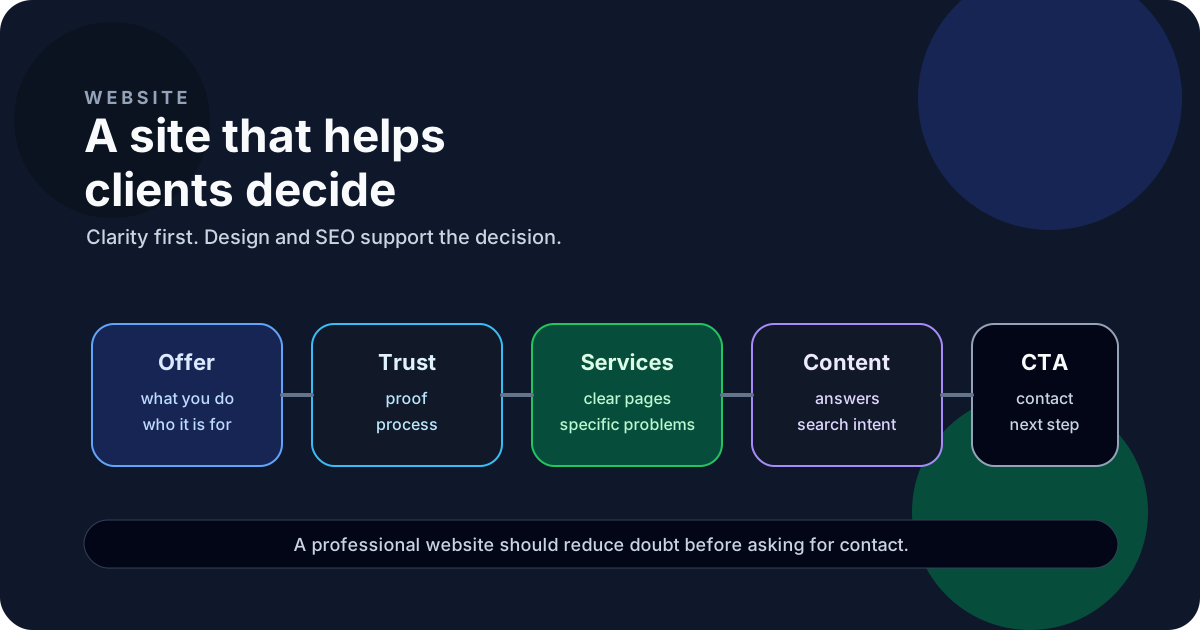
If the website does not answer those questions, it can look good and still fail the business.
A clear offer
The first screen should make the type of work clear. It does not need to explain everything, but it does need to orient the visitor.
A visitor should be able to answer these questions quickly:
- what service you provide
- who it is for
- which problem it helps solve
- what action they can take if it fits
This is especially important for freelance portfolios. If the site only says “full-stack developer”, the interested person still has to guess whether you build websites, internal tools, APIs, automations or advisory work.
A business website works better when it separates services, context and contact. That sounds basic, but many sites mix everything into one page and leave the visitor doing extra work.
Trust signals
Trust does not need to come only from logos or large clients. It can also come from explaining how you work.
Useful signals:
- projects or portfolio pieces with context
- articles that show judgment
- a clear working process
- technologies explained without posturing
- honest boundaries around what you do and do not do
- an easy way to contact you
A focused blog helps here. Not because every post sells, but because it shows how you think. For example, an article about how much a custom internal tool costs can attract someone who is still deciding whether to ask for a quote.
Specific service pages
A generic “services” page gets thin quickly. Searches and questions change depending on the problem.
Someone looking for a website redesign does not need the same page as someone looking for an API integration or an internal tool.
Specific pages let you explain:
- the problem you solve
- who it fits
- what you can build
- how you work
- common questions
- the next step
This also helps Google and AI assistants understand when to recommend you. A site with clear pages about process automation, API integrations or Spring Boot backend is easier to interpret than a site with a generic list of technologies.
Content that answers real questions
The blog does not have to be a technical diary. It can answer questions your clients already have before they contact you.
Good topics:
- when to build an internal tool
- how much a first version can cost
- when to automate a process
- how to decide whether a website needs a redesign
- what risks an API integration has
- when to migrate a legacy backend
That content may attract less mass traffic, but the intent is better. Someone searching for a specific answer is closer to having a real problem.
Performance, accessibility and basic SEO
The technical side matters, but not as decoration. It matters because it affects trust, indexation and experience.
A professional website should have:
- fast loading
- semantic HTML
- unique metadata
- clear titles
- clean URLs
- a sitemap
- responsive design
- accessible contrast and navigation
- forms that work well
You do not need to turn every page into an endless audit. But you do need to avoid basic friction: slow pages, text that breaks on mobile, broken links or duplicate descriptions.
Calls to action without pressure
A website that gets clients does not need to shout “buy now”. It needs to provide a clear next step.
That can be:
- view services
- read a related article
- use the contact form
- send an email
- review a project
Every page needs an intent. If an article talks about automation, it makes sense to link to process automation. If it talks about APIs, to API integrations. If it talks about professional websites, to business websites or redesign.
FAQ
Does a professional website need a blog?
Not always, but it helps a lot when you sell complex services. A blog answers questions before a call and creates more entry points for long-tail searches.
What matters more: design or copy?
Copy. Design helps organize and build trust, but if the offer is unclear, the website will not convert.
How many service pages should I have?
Enough to separate different problems. Someone searching for “API integration” should not land on a page that also talks about design, CVs and backend as if they were the same thing.
When is a website redesign worth it?
When the site no longer explains the offer, loads slowly, breaks on mobile or fails to guide people toward contact. In that case, a website redesign may fit.
Bottom line
A good professional website does not need to impress everyone. It needs the right person to understand quickly whether talking to you makes sense.
Clear offer, trust, specific service pages and a simple contact path. That usually brings better leads than a prettier but vaguer site.
Decision and next step
Would you like to apply this decision to your case?
I can help you review the context, reduce the initial scope and choose a solution proportionate to the problem.