How much does a custom internal tool cost, and when is it worth it?

A practical guide to estimating the cost of a custom internal tool, understanding what drives the budget, and deciding whether a small first version makes sense.
José Miguel Fernández · Software Engineer · 6+ years of experienceIn this article Current section: Rough budget ranges
The question comes up early in almost every conversation: how much does a custom internal tool cost? There is no single answer, because an “internal tool” can mean anything from a simple dashboard for reviewing orders to an application with permissions, integrations, automations and sensitive data.
The useful answer is not a magic number. It is understanding which problem you want to solve, how much manual work it removes and how reliable the process needs to be.
For a small or mid-sized company, a well-scoped first version is often more useful than trying to build a complete internal platform from day one.
Rough budget ranges
These ranges are not fixed prices. They are a way to bring some order before asking for quotes or deciding whether the project is worth exploring.
They were reviewed in August 2026 and describe freelance or small-team projects for businesses in Spain and Europe. They are not an official market average. The assumptions are a defined scope, remote delivery and code handover; VAT, third-party licences, unassessed data migration and ongoing support normally sit outside the figures. A real estimate still needs users, permissions, integrations and the consequences of failure to be reviewed.
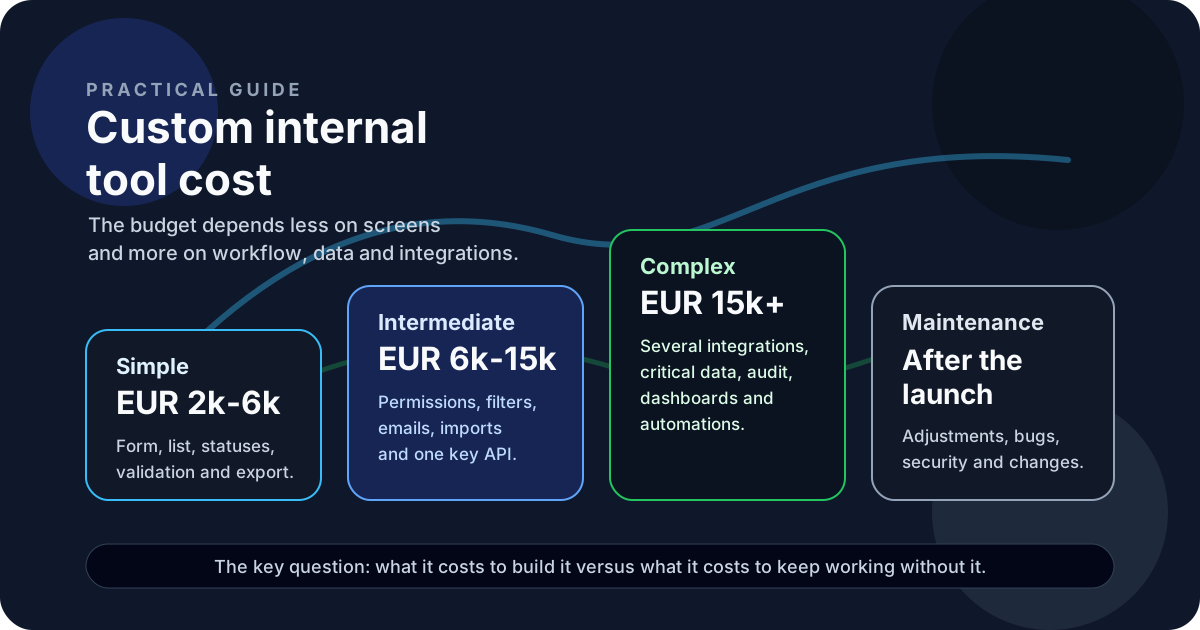
A simple internal tool can roughly sit between EUR 2,000 and EUR 6,000 if it solves one specific workflow: a form, a list, basic statuses, validation, export and an interface for a small number of people.
An intermediate tool can sit between EUR 6,000 and EUR 15,000 when it needs role-based permissions, multiple screens, filters, history, automations, emails, imports or a connection to an external API.
A more complex tool can go beyond EUR 15,000 if it needs several integrations, critical data, multiple teams, audit trails, advanced permissions, background jobs, dashboards or more demanding deployment requirements.
The difference is not just the number of screens. It is the business rules, the data, the exceptions and the cost of getting things wrong.
If you are still deciding whether the problem deserves software, start with when to build an internal tool instead of using Excel. If the problem is clearly repetitive, also read when business process automation is worth it.
What makes an internal tool more expensive
The budget rarely grows because of “adding a table” or “putting a button on a page”. It grows because of everything around the real workflow.
Permissions add complexity when not everyone can see or change the same things. One thing is a tool used by three people with the same access. Another is a tool with users, managers, administrators, clients, departments and restricted actions.
Integrations also change the budget. Connecting a tool to Stripe, HubSpot, an ERP, a CRM, Google Sheets or a custom API can remove a lot of manual work, but it requires handling formats, errors, limits, authentication and edge cases.
Historical data is another important point. Starting clean is very different from importing five years of spreadsheets with inconsistent columns, duplicates and rules that only one person understands.
Complex reports, notifications, logs, traceability, approvals, intermediate states and anything where a mistake can affect money, customers or important decisions will also increase the scope.
When it is worth building
An internal tool is worth building when the cost of the problem starts becoming higher than the cost of solving it.
The signals are usually clear:
- someone copies data between systems every day
- the team depends on a spreadsheet that nobody fully understands anymore
- tasks get lost across emails, chats and scattered notes
- repeated mistakes create delays or duplicated work
- people need to know the state of a process and cannot see it at a glance
- one key person has become “the system” because they remember how everything works
In those cases, the return does not only come from saving hours. It also comes from reducing mistakes, improving visibility and removing dependence on fragile processes.
If a tool saves 8 hours per month, a complex build may not make sense. If it saves 40 hours per month, avoids expensive mistakes or unlocks a workflow that affects sales, support or operations, the conversation changes.
When it is not worth it
Not every manual process needs custom software.
I would not build an internal tool if the workflow still changes every week, if nobody knows who would use it, if the problem only appears once per quarter or if an existing product covers 80% of the case for a reasonable subscription.
I also would not build it if the real goal is to “organize the company” without clarifying the process first. Software does not fix a confused operation by itself. Sometimes the first step is mapping how the work happens, removing unnecessary steps and deciding which data matters.
A useful question before building is this:
If this tool existed tomorrow, which decision, task or mistake would change in a concrete way?
If there is no clear answer, it is probably too early.
When the difficult part is choosing scope, supplier or priority rather than writing code, a review with a technology consultant for small businesses can prevent a premature estimate and turn the problem into a testable brief.
How to scope a first version
A good first version does not cover every possible case. It covers the workflow that hurts the most.
For example:
- data entry with validation
- one main view with the real process status
- controlled editing of records
- basic permissions if sensitive information is involved
- a simple export or report
- one key integration if it removes daily manual work
- minimal logs to understand what happened when something fails
This makes it possible to validate whether the tool is used, whether the workflow is understood and whether the savings are real. After that, it can grow with automations, dashboards, additional integrations or more advanced rules.
Building small does not mean building badly. It means not spending budget on features that have not proved they are needed.
How I would estimate a project like this
Before talking about screens, I would look at the current process:
- what comes in
- who touches it
- what changes during the workflow
- which systems are involved
- which mistakes keep repeating
- what output the team needs
- what would happen if the tool failed
From there, I would define a small and measurable scope. If the project needs a backend, database, authentication, API integrations or automations, those pieces are added because the workflow requires them, not because they sound good in a proposal.
That kind of scope usually fits internal tools, custom software or API integrations, depending on where the real pain is.
I would also separate three things clearly: initial build, deployment and maintenance. An internal tool does not end the day it goes live. It needs small adjustments, bug fixes, changes when the business changes and someone who understands how it is built.
The important decision
The price matters, but the useful comparison is different: what it costs to build the tool versus what not having it is already costing you.
If the current process works, is cheap and does not create important mistakes, you may not need to build anything. If the process already depends on impossible spreadsheets, copy-paste, scattered messages and human memory, a small internal tool can make a lot of sense.
I would start there: not with a big platform, but with a first version that solves one concrete problem and lets you measure whether it is worth continuing.
If an internal workflow is becoming slow, manual or hard to control, it is probably worth grounding the problem before asking for a large build.
FAQ
Can you estimate an internal tool without a finished design?
Yes, but the estimate will be a range. To narrow it down, you need to understand users, permissions, data, integrations and maintenance.
What makes an internal tool more expensive?
Usually permissions, integrations, historical data, business rules and errors that cannot fail silently.
Is it better to start with a small version?
Yes. A first version lowers risk and lets you measure real use before investing in dashboards, automations or advanced rules.
Decision and next step
Would you like to apply this decision to your case?
I can help you review the context, reduce the initial scope and choose a solution proportionate to the problem.