Astro 7: What Changed, Performance, and Why It Matters for the Modern Web

A practical technical guide to Astro 7: Vite 8, the Rust compiler, Sätteri, Advanced Routing, DX, performance, and when to upgrade.
José Miguel Fernández · Software Engineer · 6+ years of experienceIn this article Current section: Astro still bets on shipping less JavaScript
Astro 7 does not change Astro’s core idea. It doubles down on it.
Astro is still about generating fast HTML, shipping less JavaScript, and hydrating only the parts of a page that actually need to be interactive. The interesting changes are lower in the stack: a Rust compiler, Vite 8, a new Markdown pipeline, better routing primitives for backend-heavy sites, and smoother tooling for AI-assisted development.
That matters if you maintain a blog, portfolio, landing page, documentation site, or content-heavy website that needs to stay fast and easy to edit. It also matters if you use Astro for something closer to an application: server-side routes, APIs, middleware, caching, logging, and deployment on Vercel, Netlify, or Cloudflare.
Short version: Astro 7 is not a reason to rebuild a website from scratch. It is a good reason to review your build, Markdown pipeline, generated HTML, and integrations before upgrading.
Astro still bets on shipping less JavaScript
Astro remains strongest where content is the product: technical blogs, portfolios, professional service websites, landing pages, documentation, editorial sites, and service pages.
The difference from a traditional SPA is not just “Astro is fast”. The difference is architectural. Astro renders HTML by default and only hydrates interactive components when you mark them as islands. Everything else can remain static content, CSS, and normal links.
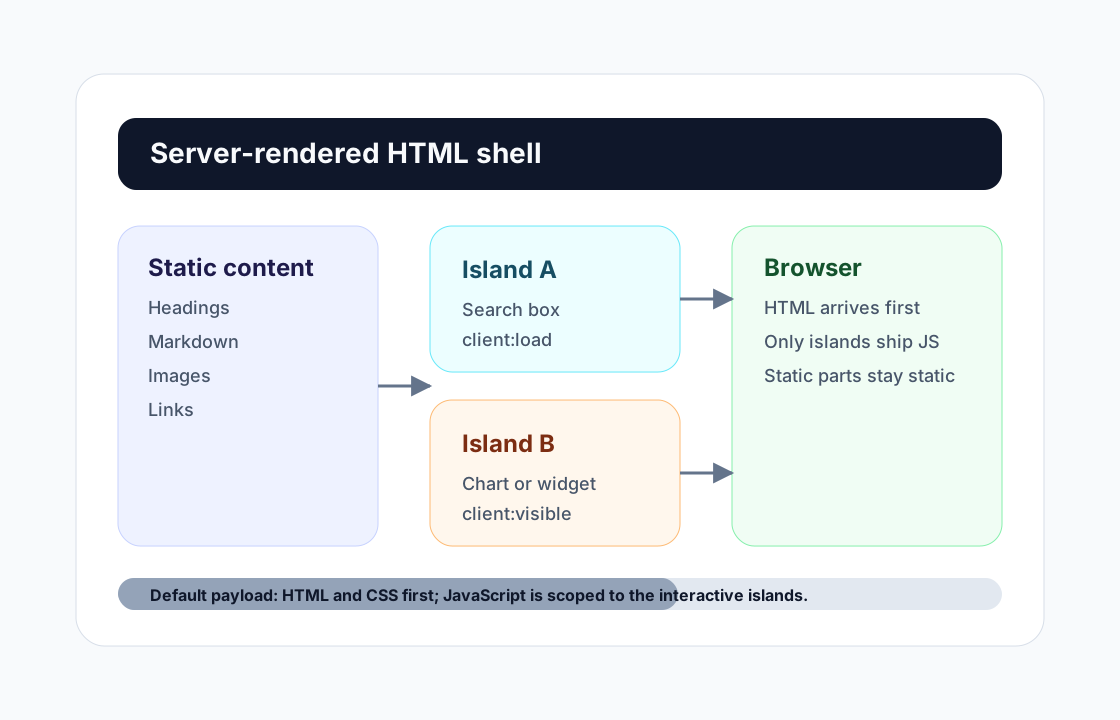
For a portfolio like this site, that trade-off fits well. Service pages, articles, and project write-ups should be indexable, fast, and easy to read. For a client who needs WordPress web design or a website redesign, the user should understand the offer without waiting for a full app to hydrate.
Astro 7 does not change that model. It improves several internal pieces that become more visible as a project grows: more Markdown, more pages, more integrations, more server logic, and more frequent builds.
Main changes in Astro 7
Astro 7.0 was released on June 22, 2026. The official announcement frames the release around build performance, compilation, and developer experience. The most relevant changes are:
- Vite 8: Astro 7 moves its tooling base to Vite 8. For most projects, the practical promise is faster builds without a full configuration rewrite.
- Rust compiler for
.astro: the previous Go compiler is gone and the Rust compiler is now the default. - Sätteri as the default Markdown processor: Astro 7 moves the standard Markdown and MDX pipeline to a native Rust-backed processor.
- Queued rendering is stable: the rendering strategy that started as experimental is now the default.
- Advanced Routing is enabled by default:
src/fetch.tsgives you more explicit control over the request pipeline, with good Hono support. - Route caching is stable:
cacheandrouteRulesare now top-level configuration options. - Background dev server: useful for coding agents and automated workflows.
- Structured logging: the logger API is stable, including JSON output.
- Breaking changes: whitespace behavior changed, deprecated transition internals were removed, and
@astrojs/dbis gone.
Not every change matters equally. For a static blog, Sätteri and the compiler are probably the headline. For an SSR app with middleware and APIs, Advanced Routing, cache, and logging are more interesting.
Astro 6 vs Astro 7
| Area | Astro 6 | Astro 7 | Practical impact |
|---|---|---|---|
| Base bundler | Vite 7 in the 6.x line | Vite 8 | Build improvements tied to the newer Vite stack. Custom plugins should still be checked. |
.astro compiler | Previous Go compiler, with Rust available experimentally | Rust compiler by default | Faster builds and iteration on larger sites, plus stricter errors for invalid templates. |
| HTML correction | The compiler could correct or reorder invalid markup | The compiler leaves markup as authored and fails invalid syntax | Run a real build and fix old templates with unclosed tags. |
| Markdown and MDX | remark/rehype pipeline by default | Sätteri by default | Content-heavy sites may benefit, but remark/rehype plugins need review. |
| HTML whitespace | compressHTML: true by default | compressHTML: "jsx" by default | Visible spaces between inline elements can change. Inspect the UI. |
| Advanced Routing | Experimental since Astro 6.3 | Stable and enabled by default | More control over auth, APIs, middleware, logging, and Hono composition. |
| Route caching | Experimental | Stable, with cache and routeRules at config root | More useful for on-demand content and CMS-backed routes. |
| Dev server for agents | Classic astro dev workflow | astro dev --background, status, logs, and stop | Less friction when working with coding assistants or automation. |
| Logging | Experimental logger in 6.2 | Stable logger with JSON and composition | Better observability for SSR and production deployments. |
| Removed APIs | Some APIs were deprecated | @astrojs/db and internal astro:transitions APIs are removed | If you used them, the migration is mandatory. |
Performance: what you should actually measure
The official Astro announcement reports meaningful build improvements across its benchmark set. That does not mean every project will see the same percentage.
Real performance depends on:
- how many static pages you generate
- how much Markdown or MDX you process
- whether you use remark, rehype, or recma plugins
- how many
.astrocomponents the project compiles - which official integrations you have installed
- whether the site is static or SSR
- how much work Vite does during bundling
On a tiny landing page, the difference might be modest. On documentation, large blogs, or sites with hundreds of content pages, the difference can be easier to notice.
It also helps to separate four metrics:
- Build time: how long
astro buildtakes. - Dev server startup: how long
astro devtakes to become ready. - Generated output size: how large
distis. - Real user experience: Lighthouse, Core Web Vitals, JavaScript weight, and actual latency.
Astro 7 mostly targets build performance and DX. If your site was already shipping very little JavaScript, end users will not magically feel a huge runtime change just because you upgraded. You may feel it as a maintainer through faster builds and stricter template errors.
Local benchmark
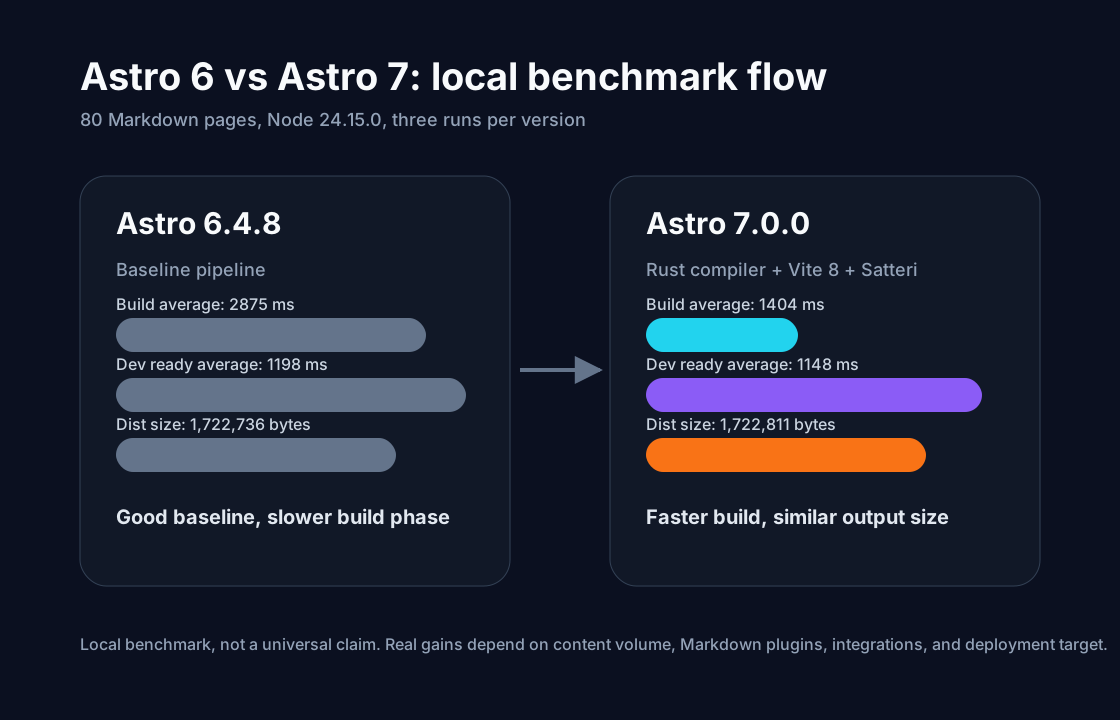
I ran a synthetic benchmark in /private/tmp, outside this repository, so the real project dependencies were not modified. The goal was to compare Astro 6.4.8 and Astro 7.0.0 with the same content and the same Node version.
Methodology:
- Node:
v24.15.0 - Temporary project with 80 Markdown pages.
- Each page included tables, code blocks, blockquotes, and lists.
- Three runs per version.
distand.astrowere deleted before each build.- Lighthouse was not run because the fixture is not a real designed website with representative assets, navigation, and user behavior.
Commands used:
npm install
npm run --silent build
npm run --silent dev -- --host 127.0.0.1 --port <port>
du -sh dist| Metric | Astro 6.4.8 | Astro 7.0.0 | Local result |
|---|---|---|---|
| Build run 1 | 2671 ms | 1506 ms | Astro 7 was faster |
| Build run 2 | 2614 ms | 1419 ms | Astro 7 was faster |
| Build run 3 | 3339 ms | 1287 ms | Astro 7 was faster |
| Average build | 2875 ms | 1404 ms | 51% less time in this fixture |
| Average dev ready | 1198 ms | 1148 ms | Small difference, around 4% |
Average dist size | 1,722,736 bytes | 1,722,811 bytes | Effectively the same |
du -sh dist | 1.9M | 1.9M | No visible difference at this scale |
Honest reading: this benchmark does not prove that every Astro site will build 51% faster. It does show that, on a small Markdown-heavy fixture, Astro 7 reduced build time clearly while keeping generated output size essentially unchanged.
For a real project, I would also measure:
pnpm run buildin the real repository before and after- generated JavaScript weight per route
- Lighthouse or WebPageTest on representative pages
- deployment time on Vercel or Netlify
- slow routes if the site uses SSR
DX and backend impact
The most visible frontend change is build speed. The more interesting full-stack changes are Advanced Routing, route caching, and logging.
Astro 7 lets you add a src/fetch.ts file to control the request flow more explicitly. That becomes useful once a site is no longer only content and starts needing auth, middleware, APIs, proxies, logging, or Hono composition.
A simplified example:
import { astro, FetchState } from "astro/fetch";

export default {
  async fetch(request: Request) {
    const state = new FetchState(request);

    if (state.url.pathname.startsWith("/api")) {
      return fetch(new URL(state.url.pathname, "https://api.example.com"));
    }

    return astro(state);
  },
};
I would not add this to a simple blog just because it exists. I would look at it for custom software, an internal tool, or an integration where Astro lives next to APIs and middleware.
Structured logging is also useful for SSR:
import { defineConfig, logHandlers } from "astro/config";

export default defineConfig({
  logger: logHandlers.json(),
});
For production, that fits better with CloudWatch, Grafana Loki, Kibana, or any log aggregation service. For AI-assisted development, the background dev server removes a real annoyance: astro dev no longer has to block an automated session. If you work with Codex, Claude Code, or similar tools, this points in the same direction as the trend I covered in MCP for developers: less manual glue, more tools that behave well inside real workflows.
Important changes before migrating
This is where it is worth slowing down. Astro 7 is not the kind of upgrade I would do blindly late on a Friday.
Markdown: Sätteri by default
Astro 7 uses Sätteri as the default Markdown and MDX processor. If your project does not depend on remark or rehype plugins, you may not need to change anything.
If you do use plugins, check them carefully. This site, for example, keeps @astrojs/markdown-remark and configures unified() to add noopener and noreferrer to external links. In that kind of project, you should not assume Sätteri will preserve the same behavior out of the box.
Configuration for staying on unified:
import { defineConfig } from "astro/config";
import { unified } from "@astrojs/markdown-remark";

export default defineConfig({
  markdown: {
    processor: unified(),
  },
});
Whitespace with compressHTML: "jsx"
Astro 7 changes the default compressHTML behavior to JSX-style whitespace. In practice, a visible space between inline elements can disappear if that space only existed because of a newline.
Example:
<span>Hello</span>
<em>world</em>
If you need a space between them, make it explicit:
<span>Hello</span> <em>world</em>This repository already sets compressHTML: true, so it keeps the previous behavior. Even then, in a real migration I would inspect headings, buttons, inline links, badges, and compact UI components.
Advanced Routing and src/fetch.ts
If you already have a src/fetch.ts file for something unrelated to Advanced Routing, Astro 7 may treat it as the routing entrypoint. The official guide recommends renaming it or configuring fetchFile.
import { defineConfig } from "astro/config";

export default defineConfig({
  fetchFile: "./src/router.ts",
});
If you do not need Advanced Routing and have a filename conflict:
export default defineConfig({
  fetchFile: null,
});
Removed or deprecated APIs
The sensitive areas:
@astrojs/dbhas been removed.- The related
astro db,astro login,astro logout,astro link, andastro initcommands are gone. - Several internal
astro:transitionsAPIs are no longer available. getContainerRenderer()from official integration package roots is deprecated in favor of@astrojs/react/container-rendererand equivalent entrypoints.experimental.rustCompiler,experimental.queuedRendering,experimental.cache,experimental.routeRules, and related experimental config should be reviewed.
Migration checklist
| Check | Why it matters | Action |
|---|---|---|
| Read the official upgrade guide | Astro 7 has real breaking changes | Review the guide before changing versions |
| Upgrade Astro and integrations together | Official integrations have aligned majors | Use npx @astrojs/upgrade or update manually |
| Run a clean build | The Rust compiler is stricter | Clear local caches if needed and run pnpm run build |
| Review Markdown/MDX | Sätteri changes the default processor | Audit remark, rehype, and recma plugins |
| Review inline whitespace | compressHTML: "jsx" can change visible spaces | Inspect UI and add {" "} where needed |
Search for src/fetch.ts | It can become the Advanced Routing entrypoint | Rename, configure fetchFile, or disable it |
Search for @astrojs/db | The package was removed | Move to Node SQLite, Drizzle, or another option |
| Search transition internals | They are no longer available | Use View Transitions Router event names |
| Review Container API imports | The recommended entrypoint changed | Use /container-renderer in official integrations |
| Measure performance | Gains depend on the project | Compare build, dist, JavaScript, and important routes |
Should you upgrade now?
| Project type | Upgrade recommendation | Why |
|---|---|---|
| Technical blog or docs with lots of Markdown | Upgrade soon, after reviewing plugins | Sätteri and the new pipeline can reduce builds, but plugins are the key risk. |
| Portfolio or professional static website | Upgrade calmly | It will likely be simple, but inspect whitespace and build output. |
| Small landing pages | No rush if everything works | Users may not notice a runtime change; the benefit is mostly maintenance and tooling. |
| Large content site | High priority | Many pages and Markdown are where build performance matters more. |
| SSR app with APIs or middleware | Upgrade after staging validation | Advanced Routing, cache, and logging are valuable, but integration risk is higher. |
| Project with many remark/rehype plugins | Wait until you audit | The Markdown migration may be the most delicate part. |
Project using @astrojs/db | Plan the migration first | Astro DB was removed and needs a replacement. |
My take: if the project is active and already on Astro 6, it is worth preparing the migration. If it is a tiny site that barely changes, do not rush without reviewing. If it is a frequently updated content site, slow CI build, or Markdown-heavy documentation project, Astro 7 is much more compelling.
Conclusion
Astro 7 matters because it improves the parts users do not see but teams feel every day: builds, compilation, Markdown processing, logging, routing, and development tooling.
It does not automatically turn a slow website into a fast one. If your real issue is third-party JavaScript, poorly served images, or confused architecture, the upgrade will not fix that by itself. But if you already use Astro well, version 7 moves in the right direction: lower build cost, more modern tooling, and better control when a site is no longer purely static.
For blogs, portfolios, and service websites, the practical message is simple: upgrade when you can measure and inspect. For backend-heavy apps, do it in a branch or staging environment and pay close attention to routing, cache, and logs.
The modern web does not need more JavaScript by default. It needs better decisions about where JavaScript belongs. Astro 7 is still a very good tool for that.
Sources
Applying this to a real system
Do you need to review this problem in production?
I can assess the architecture, risks and next useful change without turning the solution into a larger project than necessary.